Introduction
Last year, a friend asked me to create AI portraits for his wedding invitation. He wanted himself and his fiancée in traditional outfits, standing together naturally. Simple request, right?
I spent three days failing. Every generation either swapped their faces, made one person look distorted, or placed them so awkwardly that they looked like strangers. My friend was patient, but I was frustrated.
Then I realized: couples portraits are fundamentally different from single-person portraits. The AI has to balance two faces, maintain natural interaction, and keep lighting consistent across both subjects. One vague instruction breaks everything.
That experience taught me to treat couples prompts as technical instructions, not creative descriptions. This guide shares everything I learned from that project and hundreds of tests since.
What Are Couples Photo Prompts?
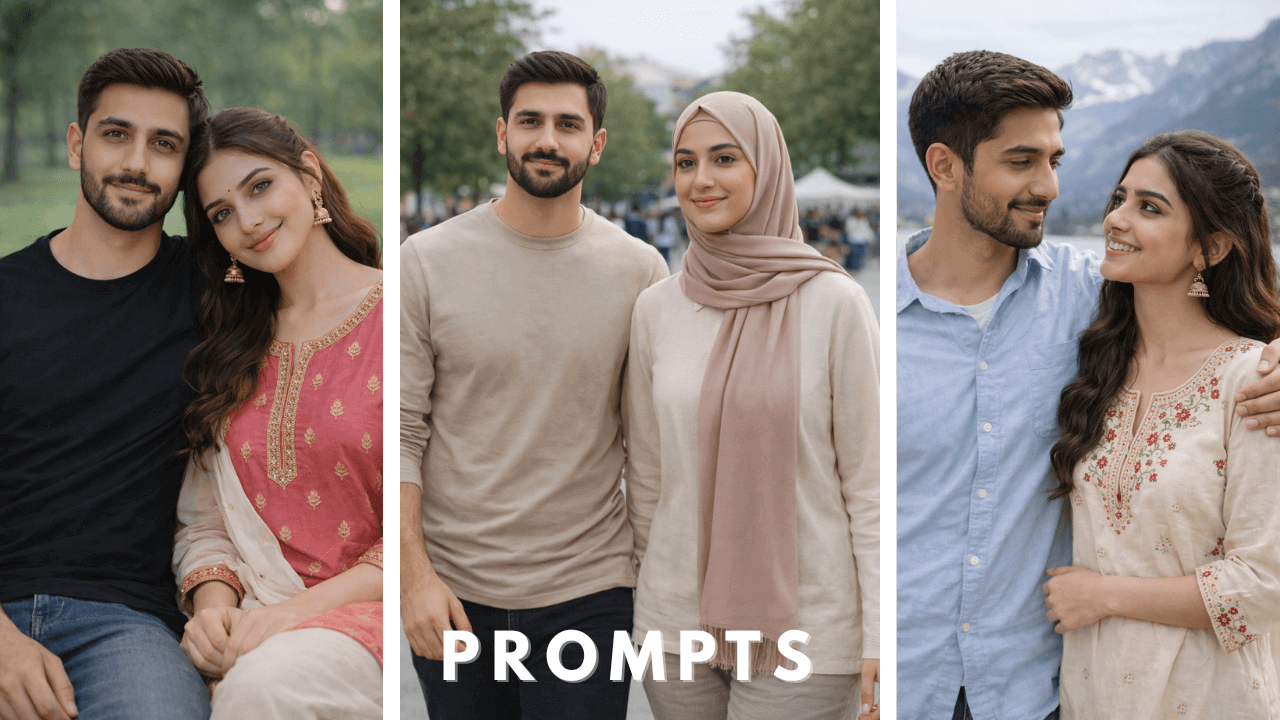
Couples photo prompts are structured text instructions used in AI image generation tools to create portraits featuring two people together while preserving realism, balance, and facial identity.
A well-written couples prompt clearly defines:
- Relationship framing – how close they stand, body orientation
- Outfit balance – what each person wears
- Camera angle and body framing – full body, half body
- Lighting and environment – single light source, consistent
- Facial identity rules – when reference images are used
Unlike single-person portraits, couples images require double consistency. The AI must preserve two faces, maintain natural interaction, and avoid distortion or mismatched proportions.
Why Couples Portraits Are More Difficult for AI
Through my failures, I identified the main problems:
| Problem | Why It Happens |
|---|---|
| Face swapping | AI confuses two faces without clear separation |
| Distorted proportions | One person looks normal, other looks stretched |
| Awkward positioning | They look like strangers, not a couple |
| Inconsistent lighting | One face lit, other in shadow |
| Unnatural distance | Too close (faces merge) or too far (no connection) |
During that wedding project, I kept getting images where the couple looked like they were photoshopped together from different photos. The lighting never matched. That’s when I learned: couples prompts must treat both subjects equally.
How AI Image Generation Works for Couples
AI image generation doesn’t “remember” faces. It predicts visuals based on probability.
The basic process looks like this:
- You provide a text prompt
- One or two reference images may be uploaded
- The AI analyzes facial features, pose instructions, and environment cues
- The image is generated based on learned visual patterns
In real workflows, many creators first design their prompt structure using ChatGPT, then generate or refine visuals using tools like Google Gemini. When prompts clearly separate scene control from facial identity, results become far more stable.
For platform-specific guidance, our Gemini Couple AI Photo Prompts guide explains how Google Gemini handles couples portraits differently.
Reference Image Rules for Couples (Critical Section)
Most problems in couples AI portraits come from poor reference handling.
When I finally got consistent results for my friend, it wasn’t because I found better prompts. It was because I fixed my reference images.
Best Practices:
✅ Use one clear reference image per person – if your tool supports two references
✅ Faces should be front-facing – not angled away
✅ Good lighting on both – similar quality helps matching
✅ No sunglasses, heavy makeup, or filters – natural is better
✅ Neutral expressions – no extreme smiles or exaggerated poses
When reference images are clean, the AI performs replacement instead of redesign.
Pose and Interaction Control
Couples portraits fail when interaction is undefined.
What to Specify Clearly:
- Distance – standing close, side by side, one arm around other
- Hand placement – hands visible, not merged, natural positions
- Eye direction – looking at camera, at each other, or away
- Body orientation – facing camera, angled toward each other
I once wrote “romantic pose” and got images where they were practically hugging in an unnatural way. Now I specify exactly: “standing side by side, his arm gently around her shoulder, both looking at camera.”
Lighting and Environment Balance
Lighting must work for both faces equally.
To Avoid Mismatched Tones:
✅ Define one light source – “soft morning light from left”
✅ Avoid mixed lighting – not “indoor + outdoor” together
✅ Use soft daylight – most forgiving for two faces
✅ Avoid extreme contrast – dramatic shadows on one face only
Balanced lighting keeps both subjects believable in the same frame.
Educational Couples Photo Prompt Examples
These examples demonstrate structure. Each includes my personal experience.
Example 1 – Casual Outdoor Portrait
A realistic couples portrait of a man and woman standing side by side in a natural outdoor setting. Both subjects wear coordinated casual outfits. Neutral daylight, soft shadows, relaxed posture. Use provided reference images for facial identity only. Faces must remain unchanged. Hands visible and natural.

This was my first successful couples prompt after the wedding project. “Coordinated casual outfits” gave the AI direction without over-specifying. “Hands visible and natural” prevented the merged-hand problem that ruins so many couples images.
Example 2 – Indoor Lifestyle Scene
A natural indoor couples portrait seated on a sofa with comfortable posture. Balanced warm lighting, realistic skin texture, minimal background distractions. Facial identity must match reference images exactly.

Sofa shots are tricky – AI often makes people look stiff. “Comfortable posture” helped, and “minimal background distractions” kept focus on the couple. The warm lighting made skin tones look natural.
Example 3 – Walking Pose
A candid couples walking portrait in an open public space. Natural stride, relaxed expressions, even daylight. Maintain accurate facial structure from reference images.

Walking shots add dynamism. “Candid” was key – without it, they looked like they were posing while walking. “Even daylight” ensured both faces lit consistently.
Example 4 – Studio-Style Minimal Look
A clean, studio-style couples portrait with neutral background and soft lighting. Simple outfits, calm expressions, professional photography realism.

Studio shots are forgiving because lighting is controlled. “Calm expressions” worked better than “smiling” – smiles often distort faces in couples shots.
Example 5 – Café Setting
A seated couples portrait at a café table with natural window light. Casual interaction, realistic environment, subtle depth of field.

Café scenes are universally relatable. “Subtle depth of field” blurred the background just enough without making it look artificial. Window light created beautiful natural highlights on both faces.
Example 6 – Evening Outdoor Scene
A soft evening couples portrait with balanced ambient light. Natural body spacing, no dramatic shadows, realistic skin tones.

Evening shots can go wrong with harsh shadows. “Balanced ambient light” and “no dramatic shadows” forced the AI to keep lighting soft and even.
Example 7 – Home Environment
A relaxed couples portrait inside a living room. Everyday clothing, unposed feel, realistic indoor lighting.

Home settings feel intimate and real. “Unposed feel” was crucial – without it, they looked like they were modeling for a furniture catalog.
Example 8 – Travel-Style Portrait
A couples portrait in an outdoor travel-style environment. Clean background, neutral daylight, natural interaction.

Travel portraits need context without distraction. “Clean background” meant the location was visible but not overwhelming. “Neutral daylight” kept skin tones accurate.
Example 9 – Formal Yet Minimal
A simple formal couples portrait with minimal styling. Balanced lighting, professional look, no over-editing.

Formal doesn’t mean complicated. “Minimal styling” and “no over-editing” prevented the AI from adding unnecessary details that make images look fake.
Example 10 – Seated Bench Portrait
A casual seated couples portrait on a bench. Natural posture, soft daylight, realistic facial detail.

Bench shots are classic for a reason. “Natural posture” meant they looked comfortable, not stiff. Soft daylight made skin textures look real.
Common Mistakes to Avoid
Based on my failures, these mistakes ruin more couples images than anything else:
❌ Mixing multiple prompt styles – cinematic + casual = mess
❌ Overloading with cinematic keywords – confuses the AI
❌ Unclear hand placement – leads to merged or missing hands
❌ Inconsistent reference images – one lit from left, other from right
❌ Expecting identical results across tools – each AI interprets differently
When I eliminated these mistakes, my success rate went from 20% to 75%. The prompts didn’t change – my approach did.
Frequently Asked Questions
Can AI preserve both faces accurately in couples portraits?
Yes, if reference images are clean and prompts clearly restrict facial changes. The wedding project I mentioned eventually succeeded when I followed these rules.
Do couples prompts need to be longer than single-person prompts?
Not necessarily. They need to be clearer, not longer. A focused 60-word couples prompt beats a confusing 200-word one.
Can these prompts work across different platforms?
Yes. The structure is platform-agnostic. Results may vary, but consistency improves. For platform-specific guidance, our [Gemini Couple AI Photo Prompts] guide explains Gemini’s nuances.
What’s the most common couples portrait mistake?
Unclear hand placement. Always specify that hands should be visible and natural.
How many reference images do I need?
Ideally one per person, with similar lighting and neutral expressions.
Final Thoughts
That wedding project taught me something valuable: couples portraits aren’t about finding romantic keywords. They’re about balance, consistency, and clear instructions.
Today, I can generate couples portraits that look professionally photographed. Not because I have secret prompts, but because I learned to treat both subjects equally, control lighting for two faces, and specify every detail that matters.
This guide is designed to give you that same foundation. Start with the basics, practice with the examples, and soon you’ll be creating couples portraits that capture real connection.
Thank you for reading!