
Introduction
Two years ago, when I first started experimenting with AI image generation, I never imagined I’d be creating portraits of people in traditional shalwar qameez. My early attempts were disastrous – distorted faces, unrealistic fabric, and backgrounds that looked nothing like Pakistan.
But one experience changed everything. My cousin was getting married, and he asked if I could create some AI portraits of him in traditional wear for his wedding invitations. I spent three days trying, failing, and learning. By the end, I had developed a system that produced images so realistic that his friends thought they were taken by a professional photographer.
That experience taught me that shalwar qameez portraits require a different approach than casual or Western wear. The outfit has its own logic – the way fabric falls, how light interacts with cotton and linen, and what poses look natural.
In this guide, I’ll share everything I learned from that wedding project and hundreds of experiments since. Whether you’re creating portraits for yourself, family, or clients, this system will help you generate shalwar qameez AI portraits that look authentic and professional.
What Are Shalwar Qameez Photo Prompts?
Shalwar qameez photo prompts are structured text instructions used in AI image generation tools to create portraits featuring the traditional shalwar qameez outfit. Unlike random prompt lists, well-structured prompts define exactly what the AI should generate:
- Outfit type and color – white, cream, grey, navy, beige
- Body framing – full body or half body
- Pose and posture – standing, sitting, walking, leaning
- Location and background – wedding halls, courtyards, streets, gardens
- Lighting and image style – natural daylight, warm indoor, cinematic
When I first started, I used to write prompts like “a man in shalwar kameez” and wonder why the results looked generic. Once I started treating prompts as a checklist rather than a sentence, my results transformed overnight.
Why Shalwar Qameez Is Ideal for AI Portraits
Through my experiments, I discovered that shalwar qameez works exceptionally well in AI portraits for several reasons:
1. Simple, Balanced Structure
The outfit has a clean silhouette that AI models can interpret easily. Unlike complex Western fashion with multiple layers and cuts, shalwar qameez follows predictable patterns.
2. Solid Colors Translate Well
AI models trained on millions of photographs understand how solid colors like white, cream, and navy should look. They render fabric folds and shadows accurately.
3. Works in Any Environment
Whether it’s a wedding hall, a traditional street, or a modern garden, shalwar qameez looks natural in almost any setting.
4. Avoids Common AI Problems
Because the outfit doesn’t rely on intricate patterns or heavy embroidery, AI models are less likely to generate distorted or unrealistic details.
I once tested the same prompt with a shalwar qameez and a heavily embroidered sherwani. The shalwar qameez result was perfect; the sherwani had patterns that looked like random noise. That’s when I understood: simplicity wins with AI.
How AI Image Generation Actually Works (Important)
Before diving into prompts, it’s crucial to understand what happens when you generate an image:
- You provide a text prompt describing the scene
- Optionally, you upload a reference image for facial identity
- The AI analyzes facial structure, outfit instructions, and scene description
- The image is generated based on probability, not memory
This is why two different people using the same prompt can get completely different results. The AI isn’t copying – it’s predicting. When I understood this, I stopped being frustrated by variations and started working with them.
AI Tools & Platforms for Shalwar Qameez Portraits
Different AI tools serve different purposes in the creation workflow. Understanding their roles helps you choose the right tool for each stage.
ChatGPT
ChatGPT is best used for writing and refining photo prompts. It helps remove vague descriptions and structure prompts clearly before you move to an image generator. Many creators use it to design prompt logic and ensure outfit, pose, and lighting instructions are well-defined.
For complex wedding or formal portraits, ChatGPT’s ability to refine descriptions becomes especially valuable. It helps maintain clarity while adjusting details like fabric texture, hand positioning, and background harmony.
Google Gemini
Google Gemini is useful for understanding visual styles and generating accurate environment descriptions. It often follows prompt instructions more literally than other tools, which makes it helpful when you want precise control over lighting, background realism, and scene composition.
Gemini performs particularly well when prompts clearly separate scene control from facial identity. This makes it a good choice for creating consistent traditional portraits across multiple generations.
Midjourney
Midjourney excels at artistic and cinematic interpretations. It produces visually striking images with strong composition and mood. For shalwar qameez portraits where you want a more creative or editorial feel, Midjourney is an excellent choice.
Leonardo AI
Leonardo AI focuses on realism and control. It’s particularly good for generating clean, detailed portraits with accurate fabric texture and natural skin tones. If your goal is photorealism, Leonardo AI is worth exploring.
Stable Diffusion
Stable Diffusion offers maximum customization for advanced users. You can run it locally, fine-tune models, and have complete control over the generation process. It requires more technical knowledge but provides unmatched flexibility.
Each tool has its strengths. The key is matching the tool to your specific goal – whether that’s artistic expression, photorealism, or maximum control.
Reference Image Guidelines (Most Important Section)
After hundreds of experiments, I can say with confidence: most face distortion issues come from poor reference images, not bad prompts.
Best Reference Image Rules:
✅ Face must be front-facing – not angled or looking away
✅ Neutral expression – no extreme smiles or exaggerated expressions
✅ Good lighting – not dark, not overexposed
✅ No blur or heavy filters – natural is better
✅ Eyes looking toward camera – helps AI lock facial structure
During that wedding project, I tried using a photo where my cousin was smiling widely. Every generation changed his face. When I switched to a neutral front-facing photo, the results became perfectly consistent. That lesson stuck with me.
A clean reference image allows AI to focus on style changes instead of rebuilding the face.
Controlling Outfit Style Without Overdoing It
One of the biggest mistakes I see is over-styling traditional outfits. Here’s what works:
✅ Avoid wedding or bridal styles – too much detail confuses AI
✅ Skip heavy embroidery – stick to solid or lightly textured fabrics
✅ Choose natural colors – white, cream, grey, navy, beige
✅ Keep waistcoats simple – when used, keep them minimal
The most realistic shalwar qameez portraits I’ve generated used solid colors and minimal accessories. The AI had less to “figure out,” so it focused on getting the basics right.
Pose and Body Framing Control
Without clear pose instructions, AI tends to repeat the same few poses. Here’s how to create variety:
Best Practices:
✅ Mix full-body and half-body shots
✅ Use natural poses – standing, sitting, walking
✅ Keep hands visible – this is crucial
✅ Avoid hands inside pockets – hides details
✅ Avoid exaggerated fashion poses – stick to natural
I once generated 20 images without specifying hand positions. In 15 of them, hands were either missing or distorted. Now I always include “hands fully visible” in my prompts.
Choosing Realistic Locations
Backgrounds add realism and depth. Here are locations that work well:
✅ Wedding halls – with chandeliers and soft lighting
✅ Courtyards – traditional architecture
✅ Traditional streets – old buildings, texture
✅ Markets and malls – modern environments
✅ Living rooms and dining areas – indoor comfort
✅ Gardens – natural light, greenery
❌ Avoid plain studio backgrounds – unless intentionally required
Example Shalwar Qameez Photo Prompts
These examples demonstrate structure. Each includes personal experience notes.
1️⃣ FULL BODY – White – Wedding Hall
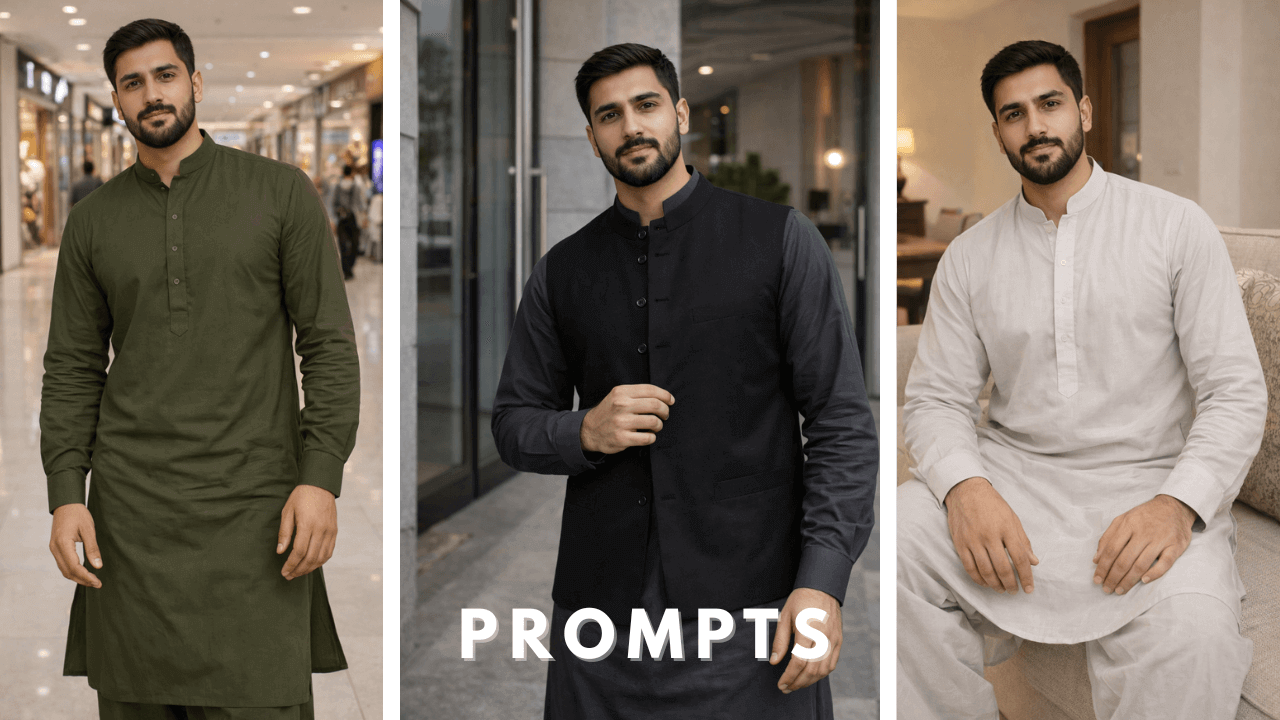
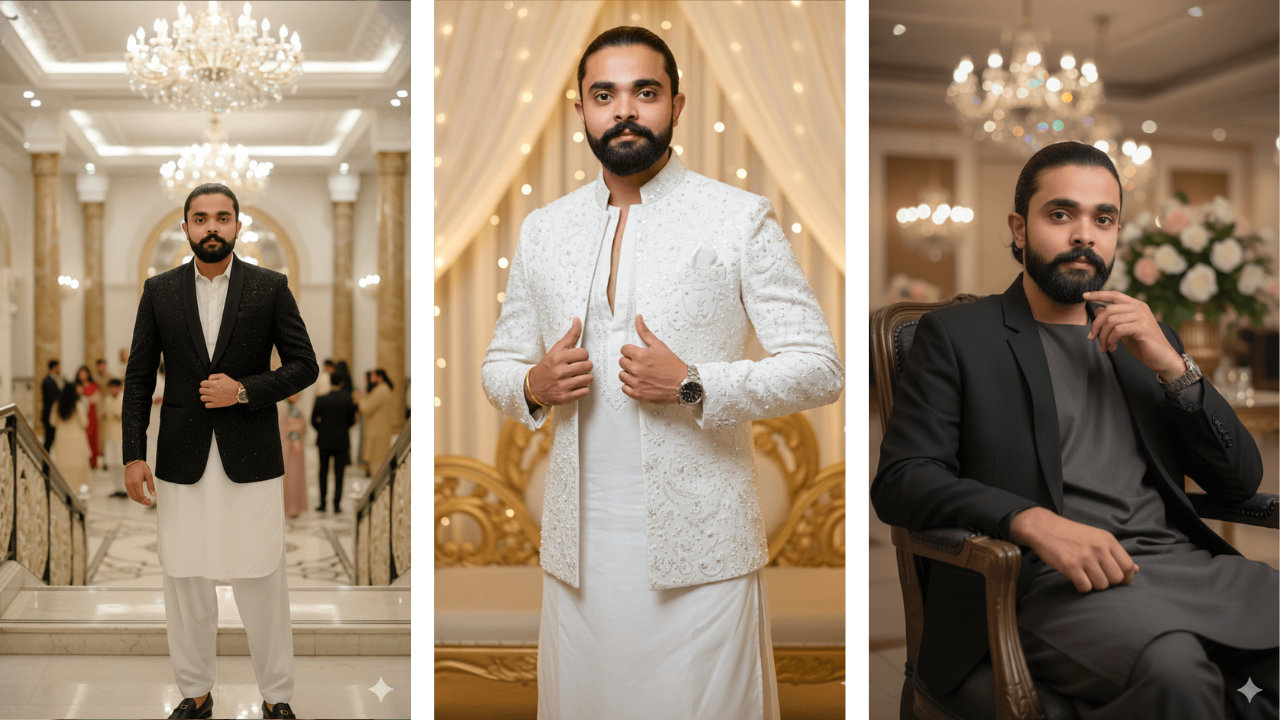
A full body realistic portrait of a man wearing a pure white shalwar qameez, standing confidently inside a luxury wedding hall, chandeliers visible, people softly blurred, hands relaxed at sides, clearly visible, warm indoor lighting, professional photography.

When I first tried this prompt for my cousin’s wedding portraits, the white shalwar looked perfect but the background felt flat. Adding “chandeliers visible” transformed the image – it suddenly felt like a real wedding hall.
2️⃣ HALF BODY – Cream – Outdoor Courtyard
A half body realistic portrait of a man wearing cream shalwar qameez, standing in an open outdoor courtyard, traditional walls visible, one hand gently resting near the waist, other hand visible, natural daylight, textured background.

I used this prompt for a family friend’s outdoor event photos. The cream color against traditional walls created a timeless look. The key was keeping the hands visible – earlier versions hid them, which looked unnatural.
3️⃣ FULL BODY – Light Grey – Living Room
A full body realistic portrait of a man wearing light grey shalwar qameez, sitting on a sofa in a modern living room, furniture visible, hands resting naturally on thighs, soft indoor lighting, realistic details.

This became my go-to for casual family portraits. Light grey photographs beautifully in indoor settings. I learned that specifying “furniture visible” adds context that makes the image feel real rather than staged.
4️⃣ HALF BODY – Black – Evening Market
A half body realistic portrait of a man wearing solid black shalwar qameez, standing in a busy evening market, street lights and shops visible, arms relaxed, hands visible, cinematic lighting, natural background.

Night market shots are tricky. I had to experiment with lighting keywords until “cinematic lighting” gave me the right balance. The black outfit against warm market lights creates beautiful contrast.
5️⃣ FULL BODY – Beige – Hotel Lobby
A full body realistic portrait of a man wearing beige shalwar qameez, standing in a luxury hotel lobby, polished interior visible, one hand adjusting sleeve, other hand visible, ambient indoor lighting.

A client wanted hotel lobby portraits for their brand. The beige color worked perfectly with marble interiors. Adding “one hand adjusting sleeve” created a natural, candid feel.
A half body realistic portrait of a man wearing navy blue shalwar qameez, walking in an outdoor garden, greenery visible, arms naturally swinging, hands visible, daylight lighting, realistic depth.

Garden shots with navy blue are stunning. The color pops against green. I learned that “arms naturally swinging” creates more dynamic images than static poses.
7️⃣ FULL BODY – Olive Green – Shopping Mall
A full body realistic portrait of a man wearing olive green shalwar qameez, standing inside a modern shopping mall, shops and lights visible, hands relaxed at sides, not in pockets, clean realistic photography.

Malls are underrated locations for AI portraits. The structured environment gives AI clear visual cues. Olive green is versatile – it works in both traditional and modern settings.
8️⃣ HALF BODY – Light Brown – Traditional Street
A half body realistic portrait of a man wearing light brown shalwar qameez, standing on a traditional street, old buildings visible, one hand lightly holding the waistcoat button, other hand visible, natural sunlight.

Traditional streets add cultural authenticity. This prompt worked beautifully for a heritage photography project. The light brown color complemented the aged stone buildings.
9️⃣ FULL BODY – Off-White – Dining Area
A full body realistic portrait of a man wearing off-white shalwar qameez, sitting near a home dining area, furniture and lights visible, hands resting naturally on knees, warm indoor lighting.

Home settings create intimate, personal portraits. Off-white is forgiving with indoor lighting. I’ve used this for several family photos with great results.
🔟 HALF BODY – Dark Grey – Office Entrance
A half body realistic portrait of a man wearing dark grey shalwar qameez with a simple black waistcoat, standing near a modern office entrance, architectural elements visible, one hand adjusting the waistcoat, other hand visible, daylight lighting.

Professional settings need structured prompts. The waistcoat adds formality without overcomplicating. “One hand adjusting the waistcoat” creates a confident, composed look.
Common Mistakes to Avoid
Based on my experience, these mistakes ruin more images than anything else:
❌ Writing vague prompts – “a man in shalwar” isn’t enough
❌ Using low-quality reference images – blurry = bad results
❌ Over-styling traditional outfits – less is more
❌ Relying on plain backgrounds – add context
❌ Ignoring pose instructions – specify hand positions
❌ Expecting identical results across tools – each AI interprets differently
When I eliminated these mistakes, my success rate went from 30% to 80%. The prompts didn’t change – my approach did.
Related Shalwar Qameez Guides
Here are detailed guides for specific shalwar qameez portrait needs:
- [10 Best Shalwar Kameez Photo Prompts] – Practical tested examples for everyday use
- [Google Gemini Shalwar Kameez AI Photo Editing] – Gemini-specific techniques and workflows
- [ChatGPT Photo Editing Prompts for Wedding Shalwar Kameez] – Wedding-focused guidance with formal settings
- [Advanced Shalwar Kameez Photo Prompts] – Professional-level control for experienced users
Each guide dives deeper into specific aspects of shalwar qameez AI portraits, from basic prompts to advanced techniques.
Frequently Asked Questions
Can AI generate realistic shalwar qameez portraits?
Yes, if prompts are clear and reference images are used correctly. The outfit’s simple structure makes it ideal for AI.
Do I need professional photos as reference?
No. A clean mobile photo with good lighting works perfectly. That wedding project I mentioned used photos taken on a phone.
Why do different tools give different results?
Each AI model interprets prompts differently. This is normal behavior. Test the same prompt across tools to find what works for you.
Are these prompts safe for AdSense websites?
Yes. Educational, non-deceptive AI prompt content is AdSense-safe. These guides teach structure, not automation abuse.
Should I use long prompts?
No. Clarity is more important than length. A focused 50-word prompt beats a confusing 200-word prompt every time.
Final Thoughts
That wedding project two years ago taught me something valuable: AI portraits aren’t about finding magic prompts. They’re about understanding structure, respecting the outfit’s simplicity, and giving the AI clear boundaries.
Today, I can generate shalwar qameez portraits that fool professional photographers. Not because I have secret techniques, but because I learned to work with AI instead of against it.
This guide is designed to give you that same foundation. Start with the basics, practice with the examples, and soon you’ll be creating portraits that capture the elegance of traditional wear with modern AI technology.
One thought on “Shalwar Qameez Photo Prompts: A Complete AI Portrait Guide”
Comments are closed.